Catch errors early, fix them fast, and keep documents moving.
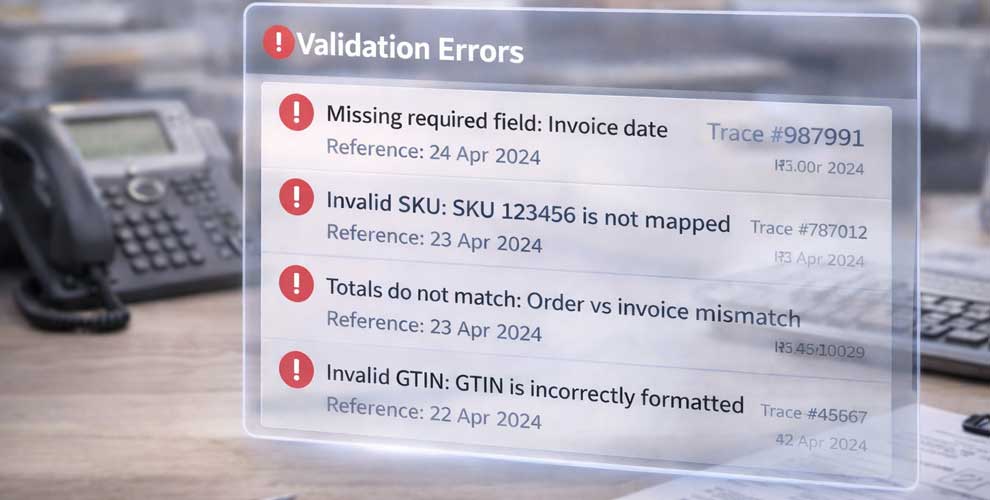
Most EDI “failures” aren’t infrastructure problems — they’re data problems. Missing references, invalid formats, SKU mismatches, totals that don’t add up, or partner-specific rules that weren’t met.
Data Error Handling surfaces issues with clear context so your team can resolve exceptions quickly and prevent repeat rejects.
The problem it solves
Bad data creates expensive operational noise:
-
documents rejected by trading partners
-
orders stuck in queues with no visibility
-
invoices delayed, impacting cash flow
-
support teams digging through logs to find the real issue
-
repeated failures because the root cause never gets fixed
Data Error Handling reduces rejects and makes issues actionable.
What Data Error Handling does
Validate before sending
Check required fields, formats and business rules before a document leaves your environment.
Clear, actionable error messages
See what failed, where it failed, and why — with enough context to fix it without guesswork.
Exception-led workflows
Group failures, prioritise what matters, and resolve issues in a repeatable way rather than one-off fixes.
Reduce repeat issues
Identify common failure patterns so you can address root causes, not just symptoms.
How it works
1) Document enters a flow
Inbound or outbound documents are processed as normal.
2) Validation runs automatically
Checks are applied based on document type, partner rules and configured requirements.
3) Exceptions are surfaced clearly
Failures appear as actionable items with trace references and error context.
4) Fix and reprocess
Correct the data or mapping issue and re-run the document without losing the audit trail.
5) Monitor trends
Use reporting to spot recurring errors and improve upstream data quality.
Key benefits
-
Lower reject rates: catch problems before partners do
-
Faster resolution: reduce time spent hunting through logs
-
Protect cash flow: fewer delayed invoices due to avoidable errors
-
Cleaner operations: consistent exception handling across teams
-
Better partner experience: fewer “invalid document” loops
Best-fit use cases
-
High-volume order and invoicing operations
-
Retailers/partners with strict validation rules
-
Multi-partner setups with different requirements per customer
-
Teams seeing repeated rejects for the same root causes
-
Organisations wanting stronger operational control and governance
FAQ
What kind of errors does this catch?
Typical examples include missing required fields, invalid formats, incorrect totals, invalid dates, missing SKU mappings, and partner-specific rule failures.
Can we see exactly where the problem is?
Yes — errors are surfaced with document context and trace references so you can pinpoint the field or rule that failed.
Can failed documents be reprocessed after a fix?
Yes — once corrected, documents can be reprocessed without losing traceability.
Is this only for outbound documents?
No — it can help with inbound and outbound flows, depending on how your documents are processed and validated.
Author
Ryan Howard
Ryan Howard writes XEDI resources covering EDI, trading partner connectivity, document automation and supply-chain integration.


Need any further assitance?
Feel free to reach out for any inquiries or assistance.
Book an appointment nowRELATED NEWS
More articles to explore
Selected updates relevant to this topic—focused on deployments, partnerships, and platform progress.
- Recent deployments & roll-outs
- Regional partner updates
- Platform updates & announcements